Technology develops rapidly. Progress in education is slow, but it is finally catching up. This change is best seen in Turkey’s digital school infrastructure. At the heart of this change is the E-Okul system.
This is more than just a website. A comprehensive management tool designed to track the growth of each student from kindergarten to high school graduation.
What is E-Okul Parent Information Service?
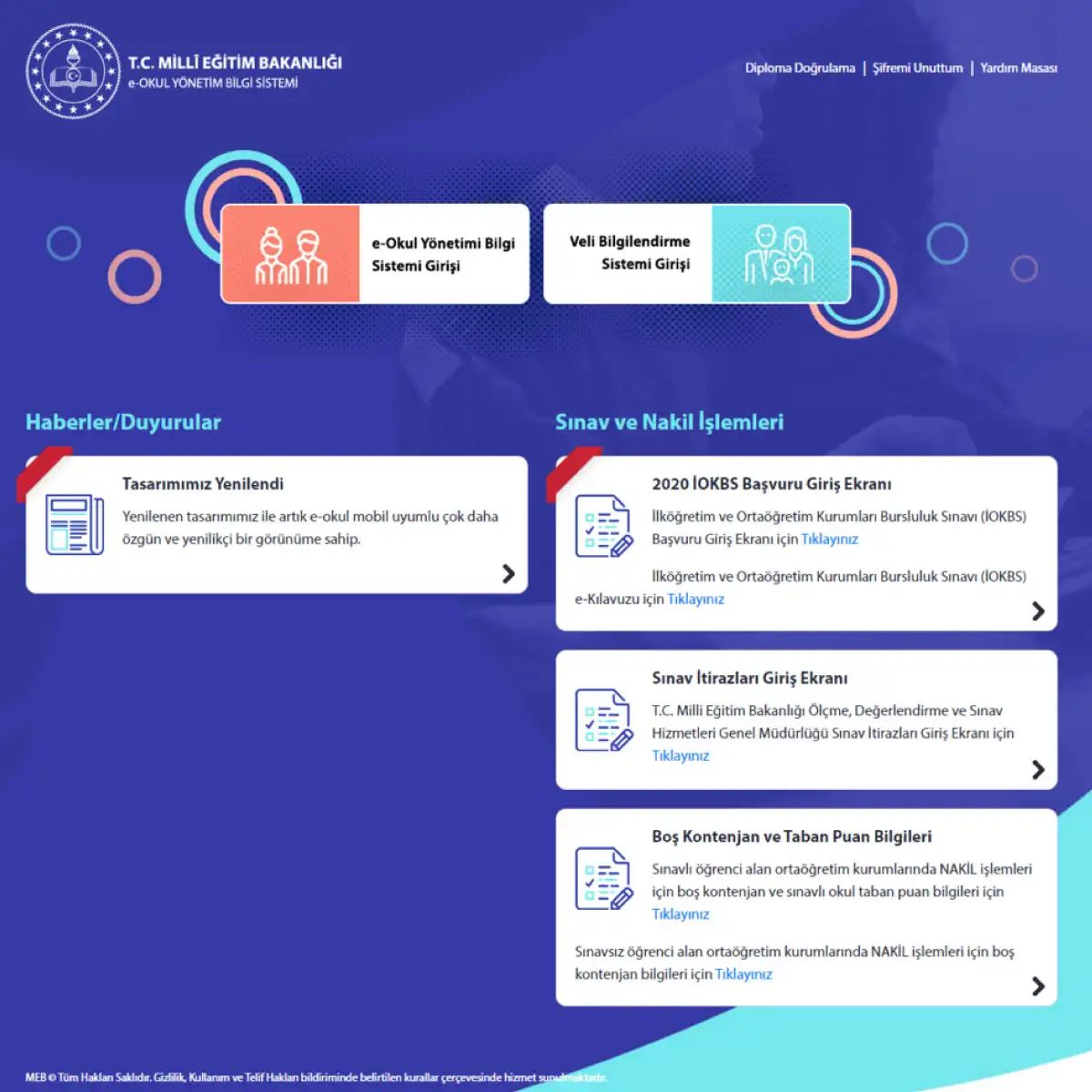
If you are a Turkish parent, you probably know this name. E-Okul Veli Bilgilendirme Servisi (E-Okul Parent Information Service) is an official portal for parents of students in public and private elementary schools.
The Ministry of State Education (MEB) introduced this system in 2007. The goal is simple: to digitize the heavy administrative procedures of the school administration. It is currently developed and maintained by the Educational Technology Directorate.
Think of it as a digital report card, attendance tracker and management center all rolled into one.
Why was it created?
Before E-Okul, schools relied on paper material. much. Transfer transcripts manually. Participation is recorded manually. If parents need information, they usually have to go directly to the school office.
Governments want efficiency. They want transparency. They need real-time data.
By creating a centralized web software, the department will be able to:
- Follow the student register electronically.
- Simplifies communication between teachers and parents.
- Reduce administrative errors.
This system covers the entire curriculum. It’s not just a transcript. This applies to students throughout their studies.
How does E-Okul help parents?
You don’t need to be a technical expert to use this. The user interface is very simple. Parents log in with the credentials provided by the school. Once inside, you will see:
- Studies: Grades, subject evaluations and progress reports.
- Attendance log: Daily presence or absence log.
- Personal information: The school keeps the students’ basic information up to date.
The goal is to keep parents informed. No more guessing if your child will attend class. No more waiting weeks for paper copies.
This is the transition from passive parenting to active parenting. You can check the information in real time.
Does it only apply to public schools?
I don’t. Initially focused on public institutions, the system has since expanded. Currently, it is also used in private elementary schools. E-Okul Parent Information Service is mandatory for all accredited primary education institutions in Turkey.
This standardization means that the data formats are consistent throughout the country. Parents who move from one city to another can expect the same system to follow their children.
Why is this important?
Education is personal. This is your child’s future. But it’s also bureaucracy. Here we explain the rules, deadlines and required documents.
E-Okul removes some of the friction. This gives parents direct access to their child’s academic life. Reduces the need for phone calls and visits. This also saves teachers’ time.
But the technology is not perfect.
Some parents are having trouble logging in. Some parents also feel that the user interface is outdated. Not all schools update their information in real time. There’s still a gap
The E-Okul platform is a central center where parents, students and school administrators can monitor the entire life cycle of education. This is not limited to public primary and secondary schools. Private institutions, kindergartens and special education centers all operate through the same digital infrastructure. The real value for families is that they can immediately know how their children are doing academically without having to make a phone call or visit the school office.
家长可以获得哪些具体信息?
该系统将各种数据点聚合到一个仪表板中。 如果您要登录以检查学生的进度,这些是您将遇到的特定模块。
学校公告
学校官员使用此频道来广播最新情况。 教师可能会发布作业提醒,而管理员则发出政策更改。 这些信息可以针对特定个人,也可以针对整个学生群体。 这是寻找紧急新闻的第一个地方。
课程表
每周的时间表在这里被数字化。 您可以准确地看到课程何时开始和结束。 该平台还列出了负责每个科目的老师。 这有助于家长协调交通或课后护理后勤工作。
出席记录
出勤分为两类:有故缺勤和无故缺勤。 家长可以监控整个学期缺勤的总天数。 这种透明度有助于在轻微缺勤变成长期问题之前及早发现模式。
成绩和分数
测试结果、项目成绩和绩效评估都记录在这里。 家长无需等待成绩单,而是可以查看老师输入的当前分数。 这样可以更频繁地检查学业成绩。
考试和项目截止日期
了解考试安排时间与了解分数同样重要。 系统列出即将举行的考试日期。 它还跟踪项目提交的截止日期。 这有助于学生管理自己的时间,并确保家长了解关键的学业里程碑。
How to log in to the parent notification system
Using the Parent Notification section requires certain credentials that are different from a typical student login. The process usually looks like this:
- **Go to official website. ** Visit the official website e-okul.meb.gov.tr Avoid third-party links imitating the portal.
- **Select the Parental Login option. ** Look for the section “Veli Bilgilendirme” (Notice to parents). This is separate from the student or teacher portal.
- Enter your ID number: You need your student’s TC Kimlik No (ID number of the Republic of Turkey) or the student number provided by your school. You must also enter the password assigned to the parent’s account.
- Two-Step Verification: In most cases, a one-time verification code will be sent to your registered mobile number. Complete the login by entering this code.
- Navigation Dashboard: Once logged in, you will see the above modules (Notifications, Schedule, Attendance, Grades) in the sidebar.
If you lose your password, you will usually receive a reset link via text message or email. If the automated recovery fails, please contact the school office. They can verify your identity and give you a new temporary password.
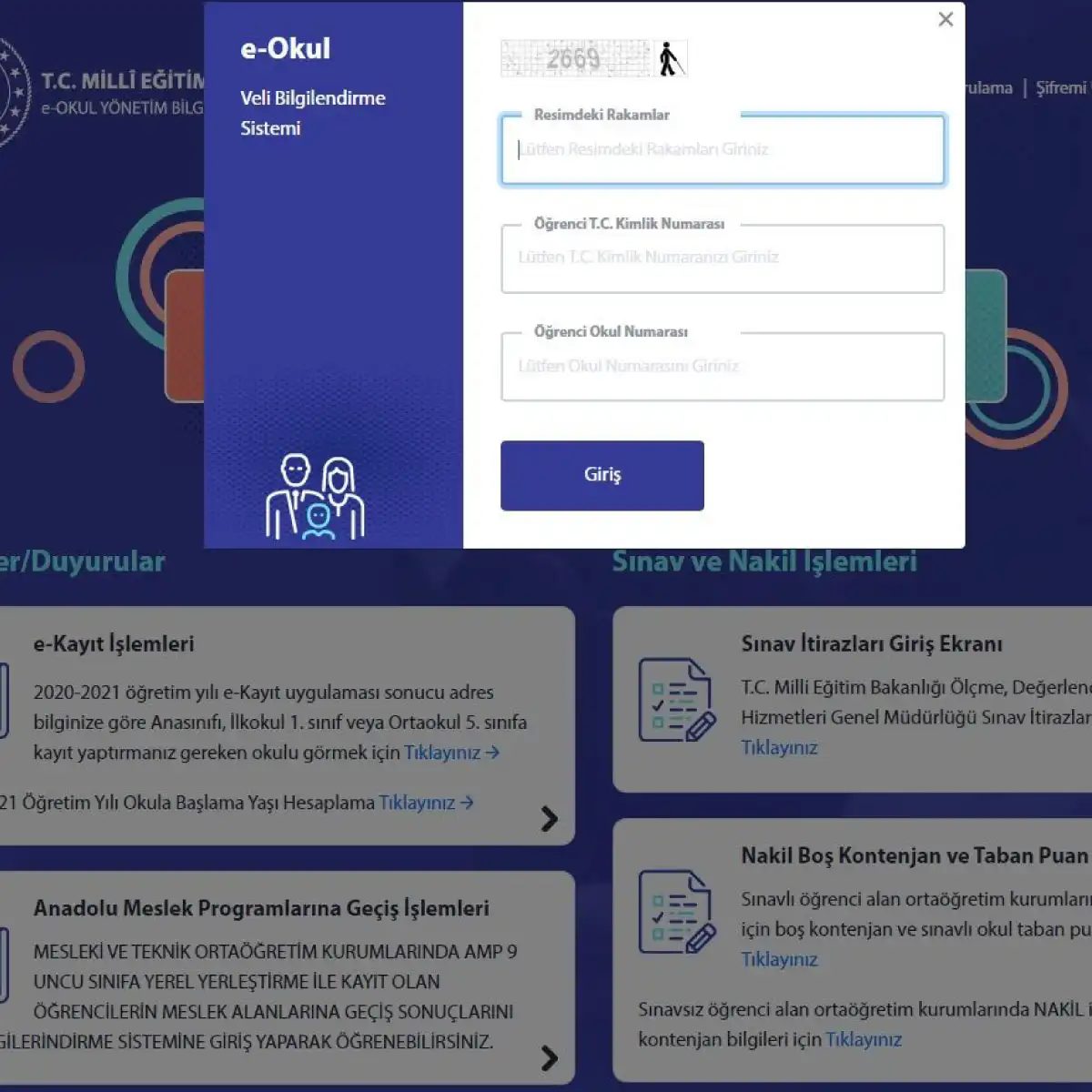
Using the E-Okul parent portal: step-by-step instructions
Accessing the E-Okul system is not complicated, but requires certain details. If you want to monitor your child’s attendance and grades, you need the right tools and the right data. First, make sure you have a device with an internet connection. Laptops, tablets and smartphones all work fine. Open a standard browser such as Chrome, Firefox or Safari. The platform doesn’t care about brand loyalty.
Go to official website
The first technical step is to access the login page. There are two reliable ways to get there. The safest way is to visit the Ministry of Education (MEB) website and click to go to the E-Okul section. Alternatively, you can type the E-Okul URL directly into the browser’s address bar. Avoid third party websites. Use official government domains to keep your data safe.
Enter identification information: key information
When you reach the login screen, you will be asked to provide two specific pieces of information. Most people get into trouble here. You must enter the student’s T.C. Identification number (TC Kimlik number). In addition to this, you also need a school number. This number is unique to the educational institution the student attends. It is not a universal code. It is characteristic of their school.
What should I do if I don’t have a T.C.? Is that number useful? It is possible to work around the system. A temporary number is generated during the initial registration process. You can use this temporary identifier if an official ID number is not available. The same functionality exists for authentication purposes.
The Security Code Layer
After entering the ID and school number,屏幕上会出现四位数的安全码。 这是一种自动化的验证码式验证。 它旨在防止机器人访问学生数据。 准确输入显示的四位数字。 它们随着每次页面加载而变化,因此不依赖内存。
Complete the login
Check your entries one last time. Typing school numbers incorrectly is common and can lead to denial of entry. If there are no problems, click the “Giriş” (Login) button. The system checks credentials against the central database. If a match is found, you will be directed to the control panel of the parental notification system. From there you can view your reports, attendance and academic records.
Sounds simple. However, if the system goes down or the temporary numbers don’t sync quickly, it can feel like you’re hitting a wall. Store your temporary number in a safe place. This is your spare key. What happens when your browser cache is messed up? Clear it. Sometimes the simplest technical fixes can get you back on track.